Saturday, September 21, 2013

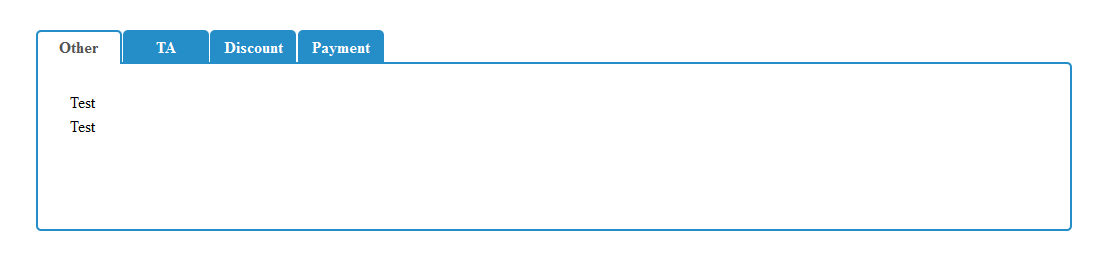
How to create Tabs using CSS3 and HTML5 without using Javascript/Jquery

Today i have learned how to create Tabs without using javascript/jquery with the help of  csscience  and css-tricks

 Download complete example and explanation here

Friday, May 10, 2013

Azure Deployment Things to remember

Better guidance with screen shots pls check it
 ------------------------------------------------------
https://www.evernote.com/shard/s152/sh/6fc3a04f-6a7b-4938-b936-2e1e3ba16c87/8b9b7c1cdb959da88c1e24c5602dbb25

1. Need to delete existing deployment package from the hosted application by using manage.windowsazure.com
2. Need to change local database  string to colud application database string in web.config or app.config
3.Need to install caching by using "Manage NuGet Packages for solution" by right click on solution 

Search for azure caching in "NuGet" Online search...  You will see "Windows Azure Caching"  then click on "Install" button


After cache installation  you will see the following content/commented content in web.config

  <configSections>
    < section name ="dataCacheClients " type=" Microsoft.ApplicationServer.Caching.DataCacheClientsSection, Microsoft.ApplicationServer.Caching.Core" allowLocation= "true" allowDefinition=" Everywhere" />
    < section name ="cacheDiagnostics " type=" Microsoft.ApplicationServer.Caching.AzureCommon.DiagnosticsConfigurationSection, Microsoft.ApplicationServer.Caching.AzureCommon " allowLocation ="true " allowDefinition=" Everywhere" />
  </configSections>

<dataCacheClients>
    < dataCacheClient name ="default ">
      < autoDiscover isEnabled ="true " identifier ="[cache cluster role name] " />
      <!-- <localCache isEnabled="true" sync="TimeoutBased" objectCount="100000" ttlValue="300" />-->
    </ dataCacheClient>
  </dataCacheClients>
  <cacheDiagnostics>
    < crashDump dumpLevel ="Off " dumpStorageQuotaInMB ="100 " />
  </cacheDiagnostics>

 <!-- Windows Azure Caching session state provider -->
    <!-- <sessionState mode="Custom" customProvider="AFCacheSessionStateProvider">
      <providers>
        <add name="AFCacheSessionStateProvider" type="Microsoft.Web.DistributedCache.DistributedCacheSessionStateStoreProvider, Microsoft.Web.DistributedCache" cacheName="default" dataCacheClientName="default" applicationName="AFCacheSessionState"/>
      </providers>
    </sessionState> -->
    <!-- Windows Azure Caching output caching provider -->
    <!-- <caching>
      <outputCache defaultProvider="AFCacheOutputCacheProvider">
        <providers>
          <add name="AFCacheOutputCacheProvider" type="Microsoft.Web.DistributedCache.DistributedCacheOutputCacheProvider, Microsoft.Web.DistributedCache" cacheName="default" dataCacheClientName="default" applicationName="AFCacheOutputCache" />
        </providers>
      </outputCache>
    </caching> -->
 Uncomment above 2 commented sections(Session State, Caching)
 Need to change  identifier  value("[cache cluster role name] ")  under  autoDiscover element to  your project current role name.
ex: My project Role Name: MyRole.  then the identifier value will be "My Role";
 < autoDiscover isEnabled = "true " identifier = "MyRole " />


- Now go to web role configuration.


- Enable caching for web role. Then double click on azure role and you will see "Caching" option then check "Enable caching" and specify the storage account credentials 

Check this link for caching info

-Set all the References "Copy Local" property to True

To Enable Win 32 Bit  to your cloud application. Perform the following steps
- Add Enable32BitAppPool file to your project and  set "Copy to Output Directory " to  "Copy Always"


Add the following task line in "ServiceDefinition.csdef" file under Startup section :
===============================================================================

<Startup priority=" -2">
<Task commandLine="Enable32BitAppPool.cmd" executionContext="elevated" taskType="simple">
      </Task>
 </Startup>

Import your colud profile to your application

- right click on  your azure project and click on publish you will see publish dialog
- If your already downloaded your cloud application settings click on import
- IF your not downloaded your cloud application settings click on "Sign in to download credentials" and download it and import it.
- Choose your subscription from the imported list.


- Click on next and ensure the cloud service and Check on "Enable Remote Desktop for all roles".

- Finally ensure all the configuration details and click on publish

Note: before starting publish. Close the other applications which consumes more virtual memory else you will get out of memory exception during the publish...


To enable SSL to your application 
=======================


Wednesday, April 3, 2013

Jquery basics

Jquery Reference Links:
=================

Jquery UI:
------------
http://code.jquery.com/ui/1.10.2/themes/smoothness/jquery-ui.css
http://code.jquery.com/ui/1.10.2/jquery-ui.js

Jquery:
---------
http://code.jquery.com/jquery-1.9.1.js

How to use page_init event(page loaded) in jquery:
=====================================
This will be used to execute initial script after complete page render. There are many ways available use page_init event in client side from that the following:
$(document).ready(function() {
    // put all your Javascript/jQuery script in here.
});

$(function(){

    // put all your Javascript/jQuery script in here.
});

How to access element by using "Id" attribute:
------------------------------------------------------
<div id="dvmyelement" > Access element by using "Id" attribute: </div>

var myelement = $("#dvmyelement");


Thursday, February 28, 2013

How find html tag and remove it from string in C#


How find html tag from string in C#
=========================

   Situation: i want to find and remove all the javascript from mystring. which can be like

<script  type="text/javascript" id="someid">

.......Some functions goes here

</script>

Now i want to remove all the script content from my string. The best way to remove script content is by using  Regularexpression

            Regex reg=new Regex("<script (.+?)</script>");
            reg.Replace(test, "");

Example:
======

 string test = "<script type='text/javascript'> Some functions goes here </script> A C# string is an array of characters declared using the string keyword. A string literal is declared using quotation marks, as shown in the following example:   ";
            test += " <br/> You can extract substrings, and concatenate strings, like this:";
            test += "<script> another text </script> <br /> String objects are immutable, meaning that they cannot be changed once they have been created. Methods that act on strings actually return new string objects. In the previous example, when the contents of s1 and s2 are concatenated to form a single string, the two strings containing \"orange\" and \"red\" are both unmodified. The += operator creates a new string that contains the combined contents. The result is that s1 now refers to a different string altogether. A string containing just \"orange\" still exists, but is no longer referenced when s1 is concatenated.";
            Regex reg=new Regex("<script (.+?)</script>");

            reg.Replace(test, "");

response.write(test);

Wednesday, February 27, 2013

How To Date filter with Devexpress XPO XPDataView


How To Date filter with Devexpress XPO XPDataView


 public string GetCreatedDate(string period, string column, string customFilterFrom = null, string CustomFilterTo = null)
        {

            string date = string.Empty; string filterexp = string.Empty;
            DateTime dt = DateTime.Today;
            switch (period.ToUpper())
            {

                case "CUSTOM":
                    date = new BetweenOperator(column, Convert.ToDateTime(customFilterFrom.Replace("/", "-")),       Convert.ToDateTime(CustomFilterTo.Replace("/", "-"))).ToString();

                    break;
                case "TODAY":
                    date = new BetweenOperator(column, dt, dt.AddDays(1)).ToString(); //string.Format("[{1}] = #{0}#", dt, column);//.ToString("MM/dd/yyyy")
                    break;
                case "LASTDAY":
                     date = new BetweenOperator(column,dt.AddDays(-1),dt).ToString();
                    break;
                case "THISYEAR":
                    date = new BetweenOperator(column, new DateTime(DateTime.Now.Year, 4, 1), dt.AddDays(1)).ToString();
                    break;

                case "THISMONTH":
                    date = new BetweenOperator(column, new DateTime(DateTime.Now.Year, DateTime.Now.Month, 1), dt.AddDays(1)).ToString();
                    break;
                case "LASTMONTH":
                    date = new BetweenOperator(column, new DateTime(DateTime.Now.Year, DateTime.Now.Month, 1).AddMonths(-1), new DateTime(DateTime.Today.Year, DateTime.Today.Month, 1).AddDays(-1)).ToString();
              
                    break;
                case "THISWEEK":
                    int days = (DateTime.Now.DayOfWeek - DayOfWeek.Sunday) - 1;
                    DateTime thisweek = DateTime.Now.AddDays(-(days));
                    date = new BetweenOperator(column, thisweek, thisweek.AddDays(days)).ToString();
                    break;
                case "LASTWEEK":
                    int diff = (DateTime.Now.DayOfWeek - DayOfWeek.Sunday) + 6;
                    DateTime mondayOfLastWeek = DateTime.Now.AddDays(-diff);
                    date = new BetweenOperator(column, mondayOfLastWeek, mondayOfLastWeek.AddDays(diff -6)).ToString();
                     break;
                default:
                    date = string.Format("[{0}] = '{1}'", column, period);
                    break;

            }
            return date;
        }


Refer my original post in devexpress : Unable to filter date values in xpo DataSource

Thursday, November 29, 2012

Free Heart Surgery for children

Free Heart Surgery for children


Source : https://www.facebook.com/photo.php?fbid=409587672445200&set=a.152699364800700.37093.151360824934554&type=1&theater

Wednesday, August 22, 2012

The 'Microsoft.Jet.OLEDB.4.0' provider is not registered on the local machine. in Server

There are times when the coexistence of 64 and 32 bit code on the same machine can cause all sorts of seemingly strange issues.
One of them just occurred to me while trying to run the ASPx demos from Developer Express, my main provider of .Net components (the best supplier I’ve ever been able to find).
I was getting the following error:
The ‘Microsoft.Jet.OLEDB.4.0′ provider is not registered on the local machine:
Server Error
It may look otherwise, but this error is generally due to either of two thing:
  • you don’t have Office 2007/2010 Jet drivers installed
  • or you are running a 32 bit application in a default x64 environment.
The first issue is easy to solve, just download the Access 2010 Database Engine from Microsoft (works with Access 2007 databases as well).
For the second one, the fix is also easy enough:
  • For Windows 2008: Navigate to Server Manager > Roles > Web Server (IIS) > Internet Information Services (IIS) Manager, then look under your machine name > Application Pool.
  • For Windows 7: Navigate to Programs > Administrative Tools > Internet Information Services (IIS) Manager, then look under your machine name > Application Pool.
Under there you can call the DefaultAppPool’s advanced settings to change Enable 32-Bits Applications to True:

Advanced Settings
You may have to restart the service for it to take effect but it should work.

Source: http://blog.nkadesign.com